Procedure

  • Subscribe to our RSS feed.
  • Twitter
  • StumbleUpon
  • Reddit
  • Facebook
  • Digg

Wednesday, May 14, 2008

How To Hide Important File Udner Jpg File

Posted on 11:33 PM by Unknown
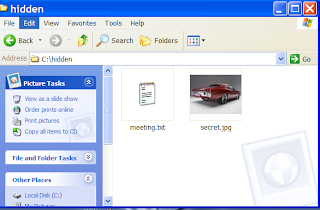
1. Gather your image and the files you wish to lodge into it. Here I have a meeting.txt which which I will slap inside my picture secret.jpg . put the files inside folder hidden (eg.) as shown below
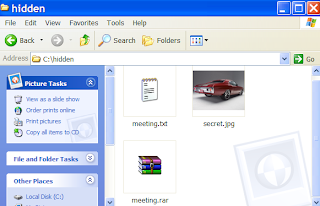
2. Add the files you want to hide into a new RAR archive eg. meeting.rar


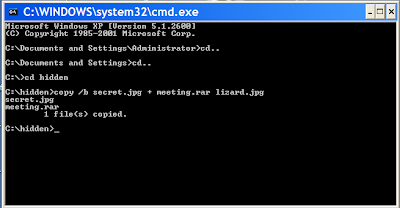
3. Open Command Prompt by typing cmd in RUN and type the following command (this is just example . comand depends on where you create the file)
>cd..
>cd..
>cd hidden
>copy /b secret.jpg + meeting.rar lizard.jpg where secret.jpg is the original picture, meeting.rar is the file to be hidden, and lizard.jpg is the file which contains both.
as shown below


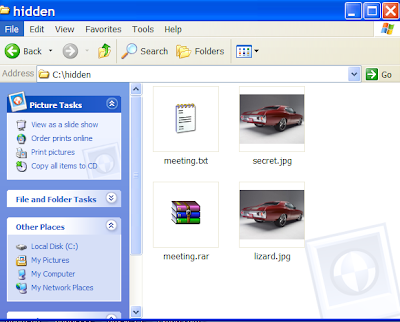
4 . so the new picture lizard.jpg which contained the hidden file is created

When you view the picture you will see only the picture (not the hidden file). To see the the hidden file inside the picture change the file extension from .jpg to .rar and extract it.
You can use this method to hide some files from average user.
Read More
Posted in how to | No comments

How To Make Your Windows Run Faster

Posted on 11:23 PM by Unknown
1. WindowsXP has a new feature called Prefetch. This keeps a shortcut to recently used
programs. However it can fill up with old and obsolete programs. To clean this
periodically go to:
Star / Run / Prefetch
Press Ctrl-A to highlight all the shorcuts
Delete them

2. Increasing System Performance
If you have 512 megs or more of memory, you can increase system performance by
having the core system kept in memory.
Start Regedit
Go to HKEY_LOCAL_MACHINE -> SYSTEM -> CurrentControlSet -> Control -> Session
Manager -> Memory Management -> DisablePagingExecutive
Set the value to be 1
Reboot the computer

3. Increase hard disk speed
Run SYSEDIT.EXE from the start & then Run command.
Expand the system.ini file window.
Scroll down almost to the end of the file till you find a line called [386enh].
Press Enter to make one blank line, and in that line type
Irq14=4096
Note: This line IS CASE SENSITIVE!!!
Click on the File menu, then choose Save.
Close SYSEDIT and reboot your computer.
Read More
Posted in how to | No comments

How To Clear Your Memory Without Restarting

Posted on 11:07 PM by Unknown
When u run your computer (windows) sometime you might feel that your computer was run slowly. It might because of the memory is almost reach it capacity. There's a solution how to clear them without restarting your computer.

1. Right click on an empty spot on your desktop and select New - Shortcut.
2. Type %windir%\system32\rundll32.exe advapi32.dll,ProcessIdleTasks in the box.
3. Click Next.
4. Give your shortcut a nice name like “Clear Memory”.
5. Click Finish and you’re done.

Now, if your computer start to run slow just double click this shortcut. And your computer will refresh again !!
Read More
Posted in how to, tips, What to do | No comments
Newer Posts Older Posts Home
Subscribe to: Posts (Atom)

Popular Posts

  • The Ubuntu guide for displaced Windows users
    With Windows 8 pushing a “touch-first” desktop interface—Microsoft’s  words , not ours—and with Valve’s  Steam on Linux  beginning to bring ...
  • Backing up your entire drive: Cloning vs. imaging
    Both cloning and imaging create an exact record of your drive or partition. I'm not just talking about the files, but the master boot re...
  • Will Samsung top Apple by withholding revolutionary tech?
    Samsung is drawing closer and closer to the technology that will transform the future of smartphones and  tablets . The company will show of...
  • Obama opposes Silicon Valley firms on immigration reform
    President Obama opposes an immigration reform bill backed by companies including Apple, Microsoft, and Adobe that would let U.S.-educated co...
  • Word vulnerability tops Microsoft's targets for Patch Tuesday
    A flaw in  Microsoft  Word ranks among the top security problems addressed by December's Patch Tuesday fixes, closing a hole that allows...
  • How to make Ubuntu Linux look like Windows 7
    Windows 8's tile-based interface puts a bold new spin on the familiar Windows interface—so bold that many long-time Windows users are th...
  • How to optimize Windows 8 on old hardware (2)
    Disable unnecessary items To further optimize Windows 8 on older hardware, we recommend disabling as many unnecessary startup items and serv...
  • How To Install MacOS On Windows Vista
    If you still think that you need macintosh computer to try MacOS, that's already in the past. Now you can try MacOS on Windows Vista. Ho...
  • Feds: MegaUpload was not entrapped
    Entrapment is one of MegaUpload's claims in its legal battle against the U.S. government. The feds are now saying this claim is "ba...
  • What it really takes to make a flexible phone (Smartphones Unlocked) Read more: http://www.cnet.com/8301-17918_1-57567014-85/what-it-really-takes-to-make-a-flexible-phone-smartphones-unlocked/#ixzz2JqPL5i4n
    A bendable screen is nice in the lab, but it will take more than flexi-glass to get your phone to touch its toes. Had Dr. Dipak Chowdhury kn...

Categories

  • apple
  • browser
  • buy
  • christmas
  • computer information
  • crack
  • cyber monday
  • download
  • files
  • firewall
  • flash disk
  • font
  • graphene
  • hard disk
  • hidden
  • Hot News
  • how to
  • intel
  • Internet
  • Internet Explorer
  • iOS
  • iPad
  • Mac
  • Malware
  • nokia
  • notebook
  • play station 4
  • processor
  • removal
  • safe
  • samsung
  • samsung. microsoft
  • security
  • sony
  • ssd
  • The Meaning Is
  • tips
  • twitter
  • ubuntu
  • video card
  • virus
  • vulnerability
  • What to do
  • windows 8
  • windows7

Blog Archive

  • ►  2013 (90)
    • ►  October (2)
    • ►  September (6)
    • ►  August (3)
    • ►  July (4)
    • ►  June (5)
    • ►  May (9)
    • ►  April (14)
    • ►  March (11)
    • ►  February (17)
    • ►  January (19)
  • ►  2012 (27)
    • ►  December (22)
    • ►  November (5)
  • ►  2010 (4)
    • ►  June (1)
    • ►  January (3)
  • ►  2009 (32)
    • ►  December (2)
    • ►  November (11)
    • ►  October (11)
    • ►  September (2)
    • ►  March (2)
    • ►  February (4)
  • ▼  2008 (39)
    • ►  October (2)
    • ►  September (2)
    • ►  August (1)
    • ►  June (1)
    • ▼  May (3)
      • How To Hide Important File Udner Jpg File
      • How To Make Your Windows Run Faster
      • How To Clear Your Memory Without Restarting
    • ►  March (1)
    • ►  February (7)
    • ►  January (22)
  • ►  2007 (46)
    • ►  December (8)
    • ►  November (9)
    • ►  September (4)
    • ►  August (2)
    • ►  July (9)
    • ►  June (14)
Powered by Blogger.

About Me

Unknown
View my complete profile